


[toc]
Overview
It’s Election time again in the Philippines and as of this posting, it is 106 days more to go before we do the midterm elections in the country where we will elect new sets of Senators, Congressmen, and local officials.
Updated link below:
Common problems that arise every election will sure come out again – voting in the PCOS machine, precinct that can’t be located, COMELEC ID (mine has not been delivered since I move and registered to Makati in 2006), and a lot more.
Since Comelec released a resolution affecting online people such as bloggers and social media users, we thought of writing an article that will help voters find their election precinct.
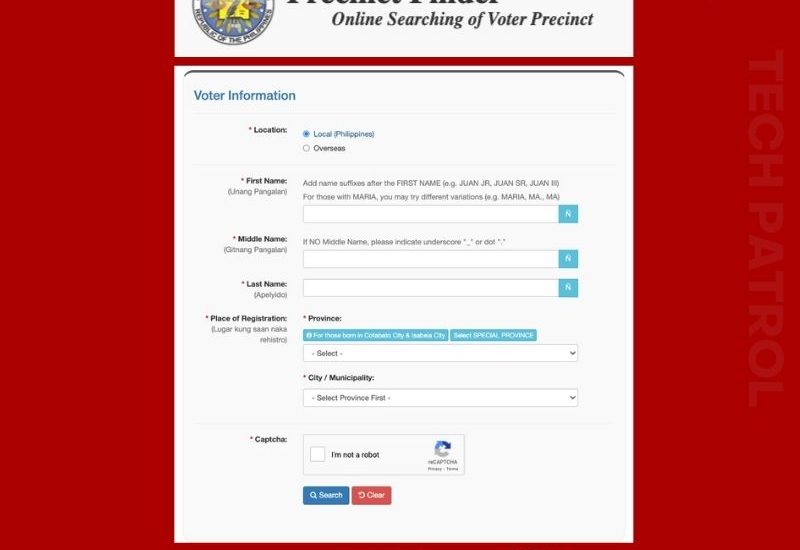
To find your Election Precinct, you need to access the Comelec website. We suggest that you do it now before nearing the Election time in May because web traffic will surely slow down the website then. The Comelec website is – http://www.comelec.gov.ph/.
There is a link in the left sidebar of the Comelec website that leads to the Precinct Finder page, or you can go and click this link. You will need to input some basic information about yourself. You can also find the precinct number of your relatives and friends, there is no restriction to that, but you should know their data too.
What do you need to input?
You need to input your First Name, Middle Name, Last Name in the fields given, then the date of your birth should be needed too. It is easy to fill up the DOB field since it is a drop-down menu.
After accomplishing the basic data needed, click Search and it will give you the details you need. Basically, your precinct number and other details such as your registration date, your province and city or municipality, your registration status, and the status of your ID printing.
Comelec has also added a nice feature that locates the location of your polling center. You can click the “See Map” link and it will show you the location map of your polling precinct.
There you go, a short and quick procedure for finding your precinct. As we said, we highly suggest that you start doing it now before the government website gets down and busy during the election.
Update: 2022
For this year’s election, the Comelec Precinct finder has been updated. It is easier to navigate and fast.
For special characters like Ñ, they already incorporated a button right in the form.

There are posts on Social Media that their record is either missing or deactivated.
Note that you have to be specific about the characters you input.
If needed, you need to try several times in order to get the right precinct. Click below to find your precinct now!


