
OS 26.2 is now rolling out, bringing a collection of efficient upgrades to the iPhone experience. This update goes beyond routine stability and security patches. Apple introduces UI refinements, deeper personalization, stronger productivity tools, and smarter media and health integrations. We reviewed all 12 confirmed upgrades to provide a clear, actionable guide for Tech Patrol readers in the Philippines and global iPhone users.
1. Liquid Glass Lock Screen Transparency Slider
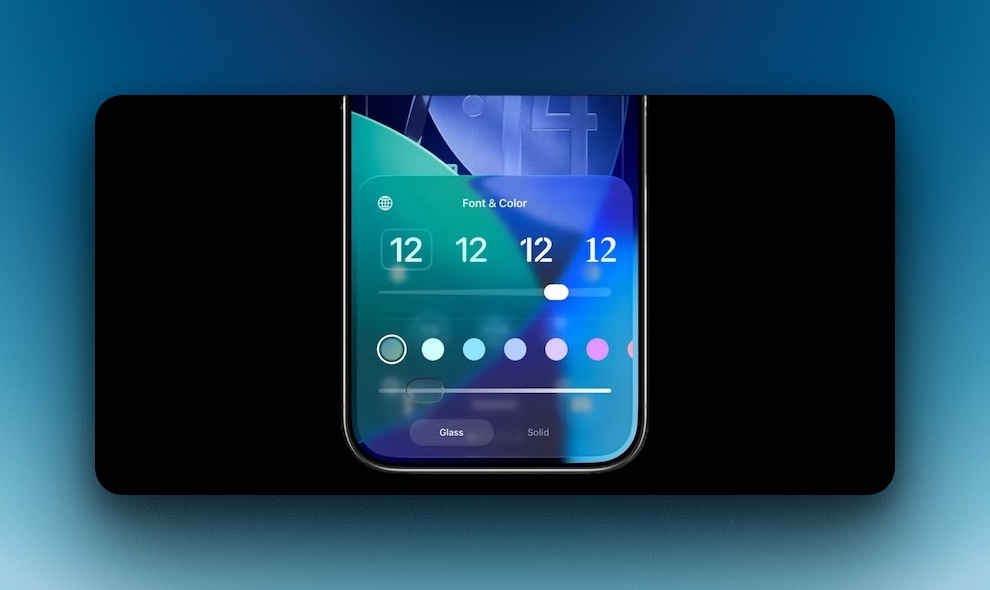
iOS 26.2 introduces a new slider that controls the opacity of the Lock Screen clock and widget background, providing a polished glass aesthetic similar to premium UI systems. To enable it, go to Settings > Wallpaper or long-press on the Lock Screen, tap Customize, tap the clock, select Glass, then adjust the transparency slider. This upgrade benefits users who prefer minimalistic or wallpaper-focused layouts.
2. Liquid Glass System Animations
The update rolls out refined motion transitions across the system, featuring smoother menu pop-ups, depth-based layers, and more responsive gestures. The result is a cleaner visual flow, especially noticeable on iPhones that support 120Hz.
3. Screen Flash Alerts for Notifications
Users can now receive visual notification alerts via the Screen Flash option, an alternative to the rear LED flash. This is beneficial in silent environments or workplaces. Activate it via Settings > Accessibility > Audio/Visual > Flash for Alerts, and select Screen Flash or LED Flash, depending on your preference.
4. Alarms Built Into the Reminders App
Reminders can now trigger full alarm notifications similar to the Clock app, overriding silent mode and Focus filters. This is ideal for deadlines, schedules, workouts, medication reminders, and daily habit tracking. Create one by opening Reminders, tapping the info icon, setting date and time, then enabling Urgent.
5. One-Time AirDrop Sharing Codes
Apple introduces temporary AirDrop access via one-time codes, allowing users to share files securely without adding contacts. This is useful for group collaborations, public interactions, and event file transfers. Activate it via Settings > General > AirDrop > Generate One-Time Code.
6. Liquid Glass Visual Upgrade for the Measure App
The Level tool in the Measure app now uses the Liquid Glass UI style, improving the readability and visual clarity of numeric values when measuring surfaces. It is a small but practical part of Apple’s push for consistency across system interfaces.
7. Excluded Website List for Password Autofill
iOS 26.2 adds an Excluded Websites feature that prevents certain domains from appearing in AutoFill prompts. Helpful for privacy, work accounts, and shared devices. Configure through Settings > Passwords > AutoFill Passwords > Excluded Domains.
8. Offline Lyrics in Apple Music
Apple Music now allows full lyric playback offline, making it possible to follow synchronized text even without signal or Wi-Fi. This benefits commuters, travelers, and users on limited data. Download a song or playlist as usual and access lyrics directly in offline mode.
Apple Podcasts gains AI-generated chapter markers, improved search suggestion behavior, and reference-based episode linking. This makes content easier to navigate, especially for long-form podcasts or educational listening sessions.
10. Updated Sleep Tracking Score System
The Health app recalibrates its Sleep Score ranges and adds a “Very High” rating tier for more precise nightly evaluation. Users relying on Apple Watch analytics will notice better context when reviewing sleep depth, recovery, and readiness patterns.
11. Live AirPods Translation (Region-Based)
iOS 26.2 activates live translation via AirPods in supported regions, starting with the EU. Philippine availability is expected but not yet confirmed. To use it where supported, open Translate with compatible AirPods inserted, then start a conversation to receive real-time in-ear translation.
12. Redesigned Apple News Interface
Apple News receives a cleaner layout including a dedicated Following tab and quick-access category buttons for areas like Business, Technology, Sports, and Puzzles. This reduces navigation time and improves the efficiency of article discovery.
Final Thoughts
iOS 26.2 is a meaningful upgrade, combining aesthetic polish with genuine functionality. Liquid Glass personalization, Reminders Alarms, offline lyrics, smarter password control, and AirDrop codes are standout additions that improve everyday use. For iPhone users who value clarity, workflow efficiency, visual refinement, and deeper device control, this update is well worth installing.


