
So, the Huawei E589 which was originally offered by Smart as the LTE Pocket WiFi was immediately sold out after the launch of LTE Prepaid. Smart offered the pocket LTE WiFi for only P6,995 as opposed to the gray market selling Huawei E589 for P8k++. Everybody was looking for it; I have searched forums, online stores, even malls but I ended up frustrated. When Smart announced that you can reserve online, I reserved one unit, hoping that I will get the same E589.
Last week, I received an email from Smart telling me I can now pick up my LTE Pocket WiFi from the store where I reserved it. Since I was away last week, I just came to pick up the item today. And here’s what I got.

A different model and brand of LTE Pocket WiFi bearing the same price. I was surprised, but I decided to get it because I really need it. I guess Huawei can’t give the same price of the E589 to Smart, so the telco opted for a new supplier. Now, the new Smart LTE Pocket WiFi is the ZTE MF93D. This device was introduced by ZTE in January this year.
The ZTE MF93D.


The size of MF93D is quite similar to the Huawei E589, housed on unibody glossy front finish, it has 2,800mAh battery, two external antenna ports, 1.4-inch LCD display, power button located on top-right area of the device. WPS button is located together with two slots – SIM and microSD, on the other side is the mircoUSB port for charging and the antenna ports.
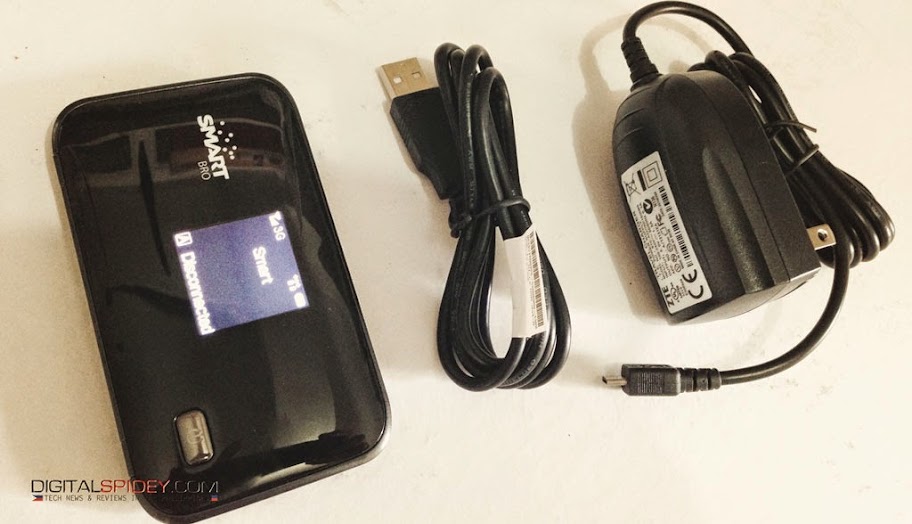
The package contains the similar items you normally find in a gadget – a charger, an extra USB cable, manuals, warranty card, the MF93D pocket wifi, and for the price of P6,995, Smart has included a Prepaid LTE SIM into the package.
MF93D can connect up to 10 devices and with its 2800mAh battery, it promise to last up to six hours. When LTE is hard to find, it switches to HSPA+ and 3G when needed.
Currently, I have my Prepaid LTE SIM connected to it, this is the SIM that Smart provided us during the launch of the Smart LTE Prepaid in April.
We will come up with a review soon. Meantime, allow us to test and use it. The little bad news is, I don’t seem to find the LTE signal back in our house when we tested it this morning. As I write this blog post, I only get a 3G signal. I hope to get the 4G signal which is up to 100Mbps according to ZTE, but Smart printed a really big label in the packaging that it only offer up to 42Mbps.
The Smart LTE Pocket WiFI login screen.

To configure your ZTE MF93D, you have to login to the default IP address (192.168.0.1). From there you can now change the SSID, change the password and starting using it after your apply the changes and reset the device.
If you are heading to Smart stores right now, you might be unlucky to get one as the subscribers who reserved it online is given priority.
ZTE MF93D uses a regular SIM card.


can you provide me the exact detail please?
why My mf93d gets a low Internet??? it only gives 0.26 to 0.70kbps in a 2 bars LTE Signal…. please reply if you know how to troubleshoot it… Thanks!
Hi Chris, yes you can do that. But it will prolong the charging, but it can be done.
i dont know if this was asked already, does the MF93D can be use while charging? TIA
Hi all, just a quick post on my MF93d. Got a 4G connection with no bars, downloaded a torrent @ 1.04Mbps, bought antenna from Uplift, but while it gave me 5 bars, I had less speed, moved to an apt about 300M away from house and got 4bars(-92dB), download has never exceeded 1Mbps, up has never exceeded 675kbps. I use my MF93 with a usb and leave connected 24/7. Will it crap out the batt? Will cross that road when it happens. My friend in Olongapo got the Huawei and it has replaceable battery, plus where my unit only got 1 bar signal, he is getting 4 bars, in same spot, so needless to say will be getting the Hauwei on next trip to Olongapo. I want to try the MIMO set up but can’t find factory antenna’s, so ordered from the states, will let you know how they work out. And will compare the ZTE against the Hauwei, at this point, I wish I had the Hauwei if only for the replaceable battery.
Do anyone please explain what is the internet wi-fi switch for? TIA
Also experiencing that problem. And it is annoying
I am planning it to report this sunday.
It has nothing to do with the settings, I have restored the unit back to default settings several times, I’ve had the same experiences as the above user. It seems to be load related, once you ask the unit to do more than the usual load, it will hang and disconnect.
I’m still investigating it myself.
Having trouble catching LTE signal in your area? Check out SkyWave Internet Antennas.
Check out our website:
http://www.uplift.ph/Accessories
Solve your internet problems with SkyWave Internet Antennas.
I have been getting really good LTE signal here in Cebu. I maxed at 27Mbps but recently, I have been having an issue with the upload and download speeds. What happened is, my previous download speed now only reaches up to 4Mbps while my upload speed is always double digits. Did somebody experience this before?
Thanks for all your help.
Has anyone tried accessing the micro SD card function of the device? I tried by inserting a micro SD card, (and, by the way I've also reformatted it into FAT32), but the web interface for the device still would not show the tab setting for the SD card. Any ideas to work around this? It is proving quite frustrating…
i had just recently bought said device and my problem is that the battery level is not showing in the device as well as in the log in page. what should i do? is there a setting for this?
Need a clean firmware
Hi there, you can call Smart to ask for the correct settings.
Hello, I would like to ask about this device. I just bought this a 2 weeks ago and everything was working fine. I was able to go 24 hours without it disconnecting. However, ever since yesterday, it has been disconnecting in irregular intervals. The disconnecting increases in frequency whenever I download or watch anything on Youtube. I’m using prepaid btw.
other notes:
does not disconnect when connected to phones only
starts to disconnect when I connect with my laptop
disconnects after 2 minutes whenever I download using IDM
I’ve tried resetting it twice already
What I have researched:
Disconnects might occur due to incorrect DNS settings
Overheating (ruled out)
Hi Ruben, any brand will do, ask in your favorite stores in the mall. Thanks!
hi spidey,
tnx a lot for your fast reply. do you know any brand that you can prefer?
ruben_LTE
Just got home, so there.. you need to disconnect first before you can manually select 4G! Enjoy your LTE. Good for your, in may place, its been 12hrs now without LTE signal… 🙁
Spiderman, appreciate it, but dont worry! I just figured it out
I was trying to use the function to search manually for the network while i was CONNECTED….
I disconnected, and then voila.
thanks =)
Can I get back to you tomorrow? I’ll see how can I help you.
Spidey.
I logged into the web interface and tried to change it to manually select network. But the selection is locked out. It has a red circle with a strike through.
What am I doing differently?
Hi Joseph, you can configure it to receive LTE signal only. Login to your MF93D, find that setting there. You don’t need firmware upgrade to do it.
Hi Ruben, you can get a repeater. Put your MF93D to where it gets good LTE signal, then activate your repeater. It will extend your LTE signal.
Spidey
to spidey,
i have zte model mf93d and can get a 4G signal in our second floor area.Our dilemna is that when we are ground floor the signal we can get from the unit to our computers are low. I would like to ask or any recommendation what device we can use to extend its range? i’ve inquired most of the computer shop in the cyberzone at megamall but none one of them can give any device. Hope you can give any advice. thanks.
I just got my MF93D today, has anyone had luck getting a debranded firmware/interface? I’d like to be able to force it to LTE only, as really thats the only network speed worth bothering with.
Thanks
Who has ZTE MF93D, the LTE Pocket WiFI of Smart? How's your battery life since acquisition?
Thats right, smarbro is the default password. Thanks Rockz!
Hi Rockz,
I have tried the Prepaid sachets lang, P299 for 7 days.. I get 2 bars LTE at home, in some areas like Greenhils I get 22Mbps, sa Megamall nakakakuha ako up to 29Mbps..
To spidey:
sir na try nyo na po ba gumamit ng FREEDOM PLAN (registered to LTE sachet) sa pocket wifi nato? may 4G signal ba? 3G lang kasi sakin tapos pag iforce 4G ko LIMITED SERVICE lumalabas.
type mo lang 192.168.0.1 – password is “smartbro” w/o the double quotes
hello po, ask ko lang kung pano ka makakapaglog in dun sa smart lte page?, san nyo po nakuha yung password?
I’m also looking for the original firmware / debranded web interface. sana meron mag post ng link and the flash tool.
Need a clean firmware/ debradning guide for this thing.
and up to now it seems this is the only blog that picked up on this
weird or signs of somethings not good about this thing?