

So, the Huawei E589 which was originally offered by Smart as the LTE Pocket WiFi was immediately sold out after the launch of LTE Prepaid. Smart offered the pocket LTE WiFi for only P6,995 as opposed to the gray market selling Huawei E589 for P8k++. Everybody was looking for it; I have searched forums, online stores, even malls but I ended up frustrated. When Smart announced that you can reserve online, I reserved one unit, hoping that I will get the same E589.
Last week, I received an email from Smart telling me I can now pick up my LTE Pocket WiFi from the store where I reserved it. Since I was away last week, I just came to pick up the item today. And here’s what I got.

A different model and brand of LTE Pocket WiFi bearing the same price. I was surprised, but I decided to get it because I really need it. I guess Huawei can’t give the same price of the E589 to Smart, so the telco opted for a new supplier. Now, the new Smart LTE Pocket WiFi is the ZTE MF93D. This device was introduced by ZTE in January this year.
The ZTE MF93D.


The size of MF93D is quite similar to the Huawei E589, housed on unibody glossy front finish, it has 2,800mAh battery, two external antenna ports, 1.4-inch LCD display, power button located on top-right area of the device. WPS button is located together with two slots – SIM and microSD, on the other side is the mircoUSB port for charging and the antenna ports.
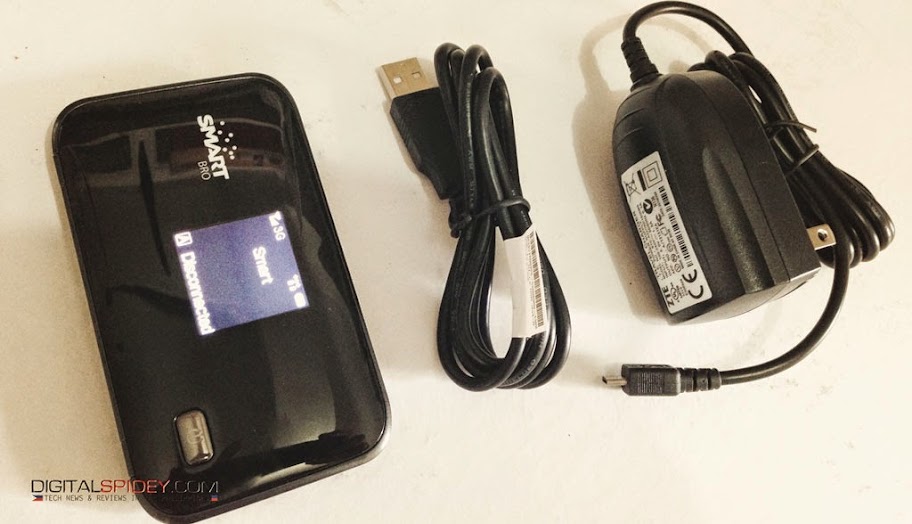
The package contains the similar items you normally find in a gadget – a charger, an extra USB cable, manuals, warranty card, the MF93D pocket wifi, and for the price of P6,995, Smart has included a Prepaid LTE SIM into the package.
MF93D can connect up to 10 devices and with its 2800mAh battery, it promise to last up to six hours. When LTE is hard to find, it switches to HSPA+ and 3G when needed.
Currently, I have my Prepaid LTE SIM connected to it, this is the SIM that Smart provided us during the launch of the Smart LTE Prepaid in April.
We will come up with a review soon. Meantime, allow us to test and use it. The little bad news is, I don’t seem to find the LTE signal back in our house when we tested it this morning. As I write this blog post, I only get a 3G signal. I hope to get the 4G signal which is up to 100Mbps according to ZTE, but Smart printed a really big label in the packaging that it only offer up to 42Mbps.
The Smart LTE Pocket WiFI login screen.

To configure your ZTE MF93D, you have to login to the default IP address (192.168.0.1). From there you can now change the SSID, change the password and starting using it after your apply the changes and reset the device.
If you are heading to Smart stores right now, you might be unlucky to get one as the subscribers who reserved it online is given priority.
ZTE MF93D uses a regular SIM card.


