
Spotted: Smart New Pocket WiFi!

I visited the Smart Switch Madness in Edsa Shangri-la today.  I went there to intentionally sign up for the Smart Bro Unli Plan 999. I was there to subscribe for the SIM-only subscription which has a 6-months lock in period. But since, Switch Madness event offers FREE Pocket WiFi, I took advantage of it.

For the switchers and new subscribers, the Huawei Pocket Wi-fi was replaced now by Alcatel OneTouch Y580. The speed is up to 7.1Mbps, however the specs published by Alcatel in their website is up to 21Mbps.

Alcatel OneTouch Y580 Specs:
Bands:UMTS 850/1900/2100 MHz, GSM 850/900/1800/1900MHz, WiFi:2.4GHz
Network: HSPA+, HSUPA, HSDPA, UMTS, EDGE, GPRS
Supports USB 2.0
Storage: Up to 32G via MicroSD
Data Speed:

  • HSDPA: 3GPP R7, up to 21Mpbs DL, HSUPA: 3GPP R6, up to 5.76Mpbs UL
  • UMTS: up to 384kbps Download & Upload
  • EDGE: up to 237Kbps Download; up to 118Kbps Upload
  • GPRS: up to 85.6Kbps Download; up to 42.8Kbps Upload

Now back to the Switch Madness of Smart, if you will sign up for the Broadband with free Pocket Wi-fi, the stocks are not yet available. I just signed up, and Smart reps promised they will call me later or tomorrow to pick up the item. The reps told me their stocks are arriving later today.
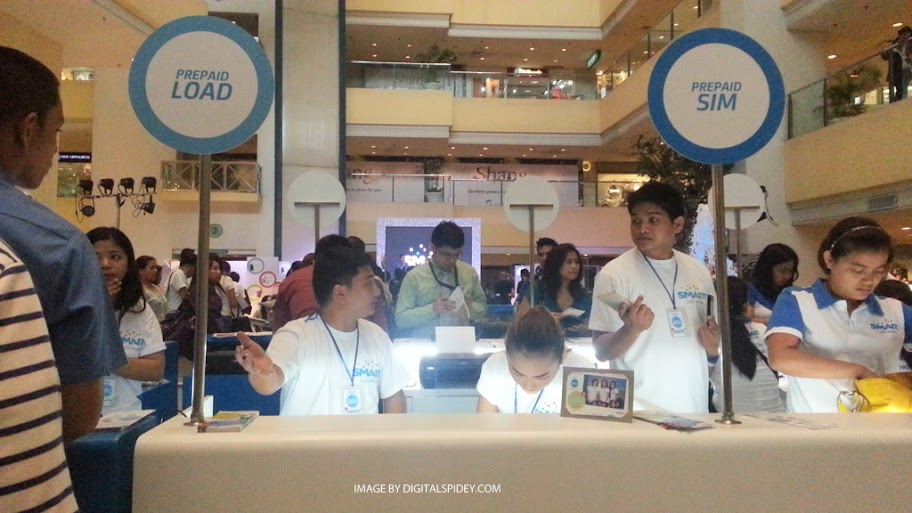
I have spotted few customers signing up for the Plan 1500 iPhone 4s, and  a lot lined up for both Prepaid and Postpaid switchers!

Here are few photos from the first day of the event.

See also  Sony Alpha a99, world's first 35mm full frame by Sony - Specs and Price inside

[mudslide:picasa,0,102474,5793120845676636065]

 
Oh, do not forget that Smart is giving away free iPhone 4S under Plan 1500 only!

Raffy Pedrajita

Written by:Raffy Pedrajita All posts by the author

Rafael Pedrajita is the founder of Tech Patrol and a seasoned freelancer and blogger who has been creating digital content since March 2010. Beyond his work in the tech space, he is a proud husband to his wife, Amor.

20 thoughts on “Spotted: Smart New Pocket WiFi!”

  1. I'm experiencing the same thing. I thought it's just a case of bad network connection.

  2. ive called the customer service kaninang madaling araw, kasi nga im puzzed how come my ipad can recognize the smart bro, and yet it wont connect. The call center agent coulnt help me either. he just told me that he will make a report abt my problem and wait for 24hrs. Im just kinda disappointed coz i got the unli 999plan, its my first time to get a smart coz im a globe user. In fact when i got the gadget i requested the smart people from SM frview to set it up for me just to be sure that i wont have any problem. Twice had i returned to their office , told me its working but whenever im going use it in my office, i got the same connection problem.

  3. Ohhh. Did you check your APN settings? You can check it by accessing your dashboard, type 192.168.1.1 in your browser. Pag di pa rin, tawag na sa Customer Service.. 😀

  4. Bought one kanina. Open the device. Search using your device. In my case, tablet. Then connect (initially, wala pang security). Once connected, go to web browser and type http://192.168.1.1 then lalabas na yung dashboard. Sign-in using smartbro as default password. Ayun, change mo yung set-up, naka-auto connect kasi, ginawa kong manual para tipid sa load! I’m trying to access it using a desktop (na walang WIFI capability) using the suppied mini-USB. Di ko ma-access yung dashboard if connected sa USB. 🙂

  5. How can I configure it? I was trying to access it via 192.168.1.1 but I'm getting page cannot be displayed.

Leave a reply

Your email address will not be published. Required fields are marked *

This site uses Akismet to reduce spam. Learn how your comment data is processed.