- Mac mini M4 vs M6: Which compact desktop belongs on your creator desk?
- Mac mini M4 vs M6 — Quick specs comparison
- Performance: The real story
- The price: Apple’s 0 gamble
- Mac mini pricing in the Philippines
- Who benefits from the M6
- Specs that stayed the same (and matter)
- The verdict: M4 or M6?
- Where to buy Mac mini in the Philippines
- Sources
Mac mini M4 vs M6: Which compact desktop belongs on your creator desk?
Apple quietly refreshed the Mac mini in August 2026, jumping from M4 to M6 and reshaping the value equation for anyone running local AI or handling video editing. The M4 was already formidable for its size; the M6 doubles down on machine learning and bumps single-threaded performance by 40%. But at $899 starting price, it’s also $300 more expensive than the M4’s launch window.
If you’re running a content studio in Makati or producing video on a budget, the decision matters. The M6 is a genuine upgrade for creators doing AI-powered editing or working with large language models locally. For everyone else, the M4 remains a steal—if you can still find one. Here’s what changed, and whether you should upgrade.
Mac mini M4 vs M6 — Quick specs comparison
| Feature | M6 Mac mini (2026) | M4 Mac mini (2024) |
|---|---|---|
| Starting price | $899 | $599 |
| Base memory | 16GB | 16GB |
| CPU cores | 12-core (2 super + 4 performance + 6 efficiency) | 10-core (4 performance + 6 efficiency) |
| GPU cores | 12-core | 10-core |
| AI Engine | Dual 16-core Neural Engine + GPU Neural Accelerators | 16-core Neural Engine |
| Memory bandwidth | 170GB/s | 120GB/s |
| Networking | Wi-Fi 7 + Bluetooth 6 + 2.5Gb Ethernet | Wi-Fi 6E + Bluetooth 5.3 + Gigabit Ethernet |
| Storage options | 256GB, 512GB, 1TB, 2TB | 256GB, 512GB, 1TB, 2TB |
| Ports | Same: HDMI, 3x Thunderbolt 4, 2x USB-C front, 3.5mm headphone | Same layout |
| Dimensions | 5″ x 5″ x 2″ | 5″ x 5″ x 2″ |
| Weight | 1.5 lbs | 1.5 lbs |
Performance: The real story
The M6 brings two headline improvements. First, Apple added “super cores” to the CPU lineup—two ultra-high-frequency cores that dominate single-threaded workloads. In Geekbench 7, that translates to roughly 40% faster single-threaded performance. If you’re compiling code, opening heavy RAW photo libraries, or running Final Cut Pro scrubbing timelines, you’ll feel the difference.
Multi-core performance climbs more modestly, around 20% according to Apple’s math. That’s still meaningful for batch processing or rendering, but not transformational.
The GPU upgrade is more interesting for creators. The M6 jumps from 10 cores to 12, and more importantly, it gets GPU Neural Accelerators built into each core. Apple claims 2x faster graphics overall and 4x faster peak AI compute on the GPU side alone. For anyone running Stable Diffusion locally, upscaling video with AI, or using machine learning plugins in Adobe Premiere, that’s the upgrade story.
But the real delta is in the AI Engine. The M6 features a dual 16-core Neural Engine (32 cores total) versus the M4’s single 16-core design. Apple claims this doubles Neural Engine performance and delivers 4.8x faster LLM prompt processing in benchmarks. If you’re running ChatGPT-like inference locally using LM Studio or similar tools, the M6 is substantially faster.
Memory bandwidth also jumped from 120GB/s to 170GB/s, which matters when you’re moving large AI models between CPU, GPU, and Neural Engine. The faster the data moves, the faster inference runs.
The price: Apple’s $300 gamble
Here’s where it gets uncomfortable. The M4 Mac mini launched at $599 for 16GB and 256GB storage. The M6 starts at $899. That’s a 50% premium on hardware that, externally, looks identical.
Apple’s justification: the memory market was in crisis when the M4 launched, squeezing margins. By August 2026, pricing stabilized enough for Apple to reclaim that gap. Whether that’s fair depends on what you plan to do.
For memory upgrades, pricing is identical: +$200 for 24GB, another +$200 for 32GB. Storage also follows the M4 playbook: +$200 for 512GB, +$300 for 1TB (up from $200), and +$500 for 2TB. The Ethernet upgrade to 10Gb remains $100.
Mac mini pricing in the Philippines
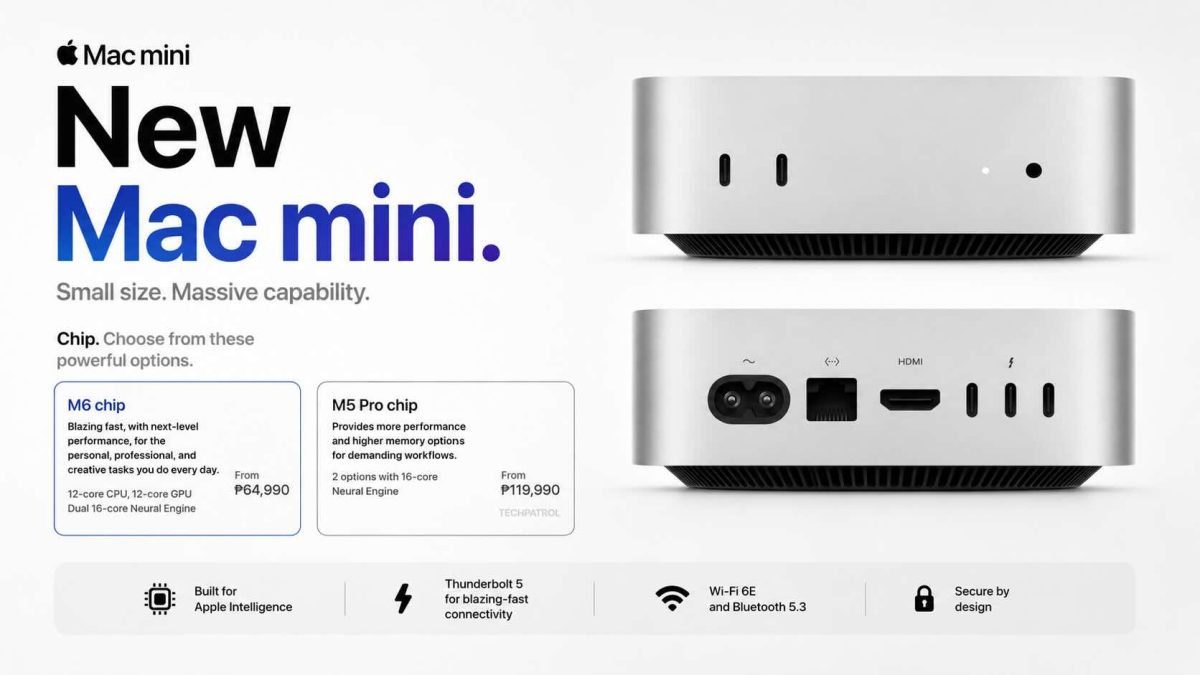
The M6 Mac mini will arrive in the Philippines at ₱64,990 for the base 16GB/256GB configuration, according to Technobaboy’s report citing Apple’s official Philippine pricing. That’s roughly $1,040 USD equivalent at current exchange rates—a 15% markup over the US price, typical for Apple products in Philippine retail.
Where to buy the M6 in Philippines: Apple’s official PH store (apple.com/ph) currently shows “check back later” for availability. Expect official availability September 22, 2026, through:
- Apple Premium Resellers (Power Mac Center, Digimap)
- Apple’s online store (apple.com/ph)
- Tech retailers (Techland, Beyond the Box)
M4 Mac mini still available: Stock is limited but the M4 remains priced aggressively at DataBlitz:
- ₱36,990 (16GB/256GB)
- ₱48,990 (16GB/512GB)
- ₱60,950 (24GB/512GB)
The price difference is dramatic: ₱27,000-28,000 less for the M4 base model. For creators on a tight budget, the M4 clearance is worth hunting down before stock dries up.
Who benefits from the M6
If you’re running local AI inference—LLMs, image generation, voice processing—the M6 is a clear win. The dual Neural Engine and GPU accelerators make a tangible difference.
If you’re editing 4K or 8K video in Final Cut Pro and your timeline is sluggish, the CPU upgrade helps. Same for photo batch processing in Capture One or Lightroom.
If you’re just browsing, writing, and running standard creative tools (Adobe apps, web dev, music production), the M4 still does everything the M6 does. The speed difference is a nice-to-have, not a necessity.
For Filipino content creators building a studio setup, here’s how it breaks down:
M6 makes sense if you:
- Run a YouTube/TikTok studio in Makati, BGC, or Cebu and edit 4K/8K daily (Final Cut Pro with proxy workflows)
- Build AI tools or SaaS products that run local LLM inference
- Use Adobe’s generative features, Topaz Gigapixel, or other ML upscaling tools on batches of photos/footage
- Stream or create heavily and need a second render machine while your main MacBook works
M4 is still the smarter choice if you:
- Freelance as a video editor or motion designer (edit 1-3 projects per month)
- Create YouTube content part-time alongside a day job
- Teach or tutor and use Mac for presentations, docs, light editing
- Need a reliable, quiet all-in-one desktop for office work + casual creative projects
The M4 clearance at ₱36,990 is particularly smart for solo creators in the ₱30-40k budget band—that’s cheaper than a mid-range MacBook Air and way more capable for stationary workloads.
Specs that stayed the same (and matter)
Both the M4 and M6 keep the identical port layout: HDMI, three Thunderbolt 4 ports, two USB-C ports on the front, and a 3.5mm headphone jack. No Thunderbolt 5 here—that’s locked to the MacBook and Mac Pro.
Storage is user-upgradable on the M4; it’s unclear yet whether Apple kept that door open on the M6. If you need to add storage later, the M4’s socketed SSD is a major selling point over paying Apple’s upgrade tax.
Display support is nearly identical, with minor tweaks to refresh rates at the extremes (8K 60Hz or 5K 120Hz or 4K 240Hz on the M6 vs. 8K 60Hz or 4K 240Hz on the M4). Unless you’re running bleeding-edge display tech, this won’t affect your setup.
The M6 does upgrade Ethernet from Gigabit (with 10Gb optional) to 2.5Gb standard, plus Wi-Fi 7 and Bluetooth 6 instead of Wi-Fi 6E and Bluetooth 5.3. For a wired home network, 2.5Gb is more than enough; Wi-Fi 7 is overkill in most Philippine homes, but it future-proofs the machine.
The verdict: M4 or M6?
Buy the M6 if:
- You’re running local AI models or LLMs regularly
- You need the fastest single-threaded performance for video editing or compilation
- You’re building products that ship AI features
- You plan to keep this machine for 4+ years and want future-proofing
Buy the M4 if:
- You can find remaining stock at discount (around ₱40k)
- You edit 4K video occasionally, not daily
- You value the cheaper entry point and don’t need AI acceleration
- You plan to upgrade again in 2-3 years anyway
Upgrade from M4 to M6 only if:
- You’re already running heavy AI workloads and hitting performance ceilings
- You’re a professional video editor or software developer where 40% single-core gains matter
- You’ve got the budget and don’t mind the $300 jump
For most creators and writers in the Philippines, the M4 remains the smarter buy if you can find stock. The M6’s AI and performance gains don’t justify $300 more unless you’re specifically doing AI-heavy work. Apple’s pricing reflects market conditions, not revolutionary features—and that’s worth thinking about before you commit.
Where to buy Mac mini in the Philippines
Mac mini M6 (₱64,990, available September 22):
- Apple Store Philippines (apple.com/ph) — Official, includes Apple warranty and Trade-In program
- Power Mac Center — Multiple locations (Makati, BGC, Cebu, Davao)
- Digimap — Authorized Apple retailer with financing options
- Beyond the Box — Tech specialist retailers
Mac mini M4 (₱36,990-60,950, limited stock):
- DataBlitz (ecommerce.datablitz.com.ph) — Best current pricing, ships within 24 hours in Metro Manila
- Carousell (secondhand market) — Occasional M4 units from sellers, price negotiable
- Power Mac Center — May have clearance stock at reduced pricing
- Best to call retailers and confirm availability before visiting.
Sources
- Apple Newsroom: Apple Unveils a More Powerful Mac mini Featuring the All-New M6 and M5 Pro (Official Apple benchmarks and specs)
- Technobaboy: Apple Launches Mac mini M6 and M5 Pro, PH Prices Revealed (Philippine pricing ₱64,990)
- DataBlitz: Apple Mac Mini M4 (Current M4 pricing in Philippines)
- Apple Store Philippines: Buy Mac mini (Official PH retail channel)